Render MVF v3 with MapKit
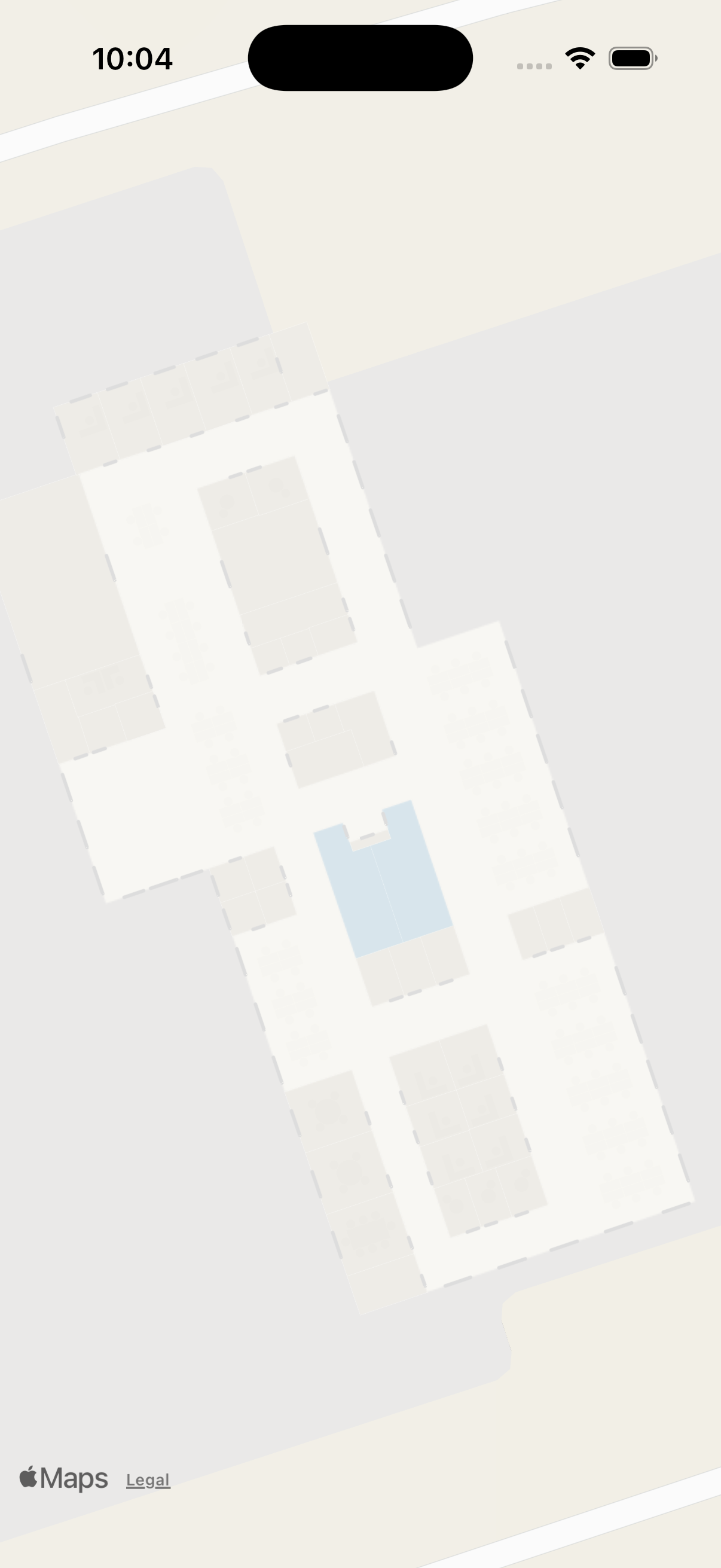
A GeoJSON renderer is required to display Mappedin Venue Format (MVF) data. For a full breakdown of the MVF v3 bundle, read the MVF v3 Specification. This guide demonstrates how to render MVF v3 data with MapKit, Apple's native mapping framework for iOS. Unlike MVF v2, which separates geometry into space/ and obstruction/ directories, MVF v3 combines all geometry into a single geometry/{floorId}.geojson file and uses a default-style.json file to define styles.
Project Setup
This example uses a SwiftUI project with the ZIPFoundation package for extracting the MVF v3 zip bundle. The project consists of four files:
- RenderMFVv3MapKitApp.swift — App entry point.
- ContentView.swift — SwiftUI view that embeds the MKMapView.
- MapViewModel.swift — Core logic for downloading, parsing, and rendering the MVF v3 bundle.
- UIColor+Hex.swift — Extension to convert hex color strings to
UIColor.
- Create a new SwiftUI project in Xcode.
- Add the ZIPFoundation package dependency via File > Add Package Dependencies.
Get an Access Token
The Mappedin API requires an access token to download the MVF bundle. This guide uses the Demo API key to get an access token from the API Key REST endpoint.
struct TokenResponse: Codable {
    let accessToken: String
    let expiresIn: Int

    enum CodingKeys: String, CodingKey {
        case accessToken = "access_token"
        case expiresIn = "expires_in"
    }
}

// See Demo API key Terms and Conditions
// https://developer.mappedin.com/docs/demo-keys-and-maps
private let apiKey = "mik_yeBk0Vf0nNJtpesfu560e07e5"
private let apiSecret = "mis_2g9ST8ZcSFb5R9fPnsvYhrX3RyRwPtDGbMGweCYKEq385431022"

private func getAccessToken() async throws -> String {
    let url = URL(string: "https://app.mappedin.com/api/v1/api-key/token")!
    var request = URLRequest(url: url)
    request.httpMethod = "POST"
    request.setValue("application/json", forHTTPHeaderField: "Content-Type")

    let body: [String: String] = [
        "key": apiKey,
        "secret": apiSecret
    ]
    request.httpBody = try JSONSerialization.data(withJSONObject: body)

    let (data, _) = try await URLSession.shared.data(for: request)
    let response = try JSONDecoder().decode(TokenResponse.self, from: data)
    return response.accessToken
}
Download the MVF v3 Bundle
The Get Venue MVF endpoint is called with the map ID and the version=3.0.0 query parameter to request the MVF v3 format. The response contains a URL to the MVF v3 bundle, which is downloaded and saved to a temporary file for extraction.
struct VenueResponse: Codable {
    let url: String
    let updatedAt: String

    enum CodingKeys: String, CodingKey {
        case url
        case updatedAt = "updated_at"
    }
}

private let mapId = "64ef49e662fd90fe020bee61"

private func downloadMVFBundle(accessToken: String) async throws -> URL {
    let url = URL(string: "https://app.mappedin.com/api/venue/\(mapId)/mvf?version=3.0.0")!
    var request = URLRequest(url: url)
    request.setValue("Bearer \(accessToken)", forHTTPHeaderField: "Authorization")

    let (data, _) = try await URLSession.shared.data(for: request)
    let venueResponse = try JSONDecoder().decode(VenueResponse.self, from: data)

    let zipUrl = URL(string: venueResponse.url)!
    let (zipData, _) = try await URLSession.shared.data(from: zipUrl)

    let tempDir = FileManager.default.temporaryDirectory
    let zipPath = tempDir.appendingPathComponent("venue_mvfv3.zip")
    try zipData.write(to: zipPath)

    return zipPath
}
Loading the Data
The GeoJSON data for an MVF is split into multiple parts, often separated by floor ID. The structure of this bundle is explained in the MVF v3 Specification. The loadFileFromZip function extracts individual files from the zip archive and returns them as raw Data.
private func loadFileFromZip(archive: Archive, path: String) throws -> Data {
    guard let entry = archive[path] else {
        throw NSError(
            domain: "ZipError", code: 2,
            userInfo: [NSLocalizedDescriptionKey: "File not found in zip: \(path)"])
    }

    var data = Data()
    _ = try archive.extract(entry) { chunk in
        data.append(chunk)
    }
    return data
}
For a basic 2D rendering, the following datasets are needed:
- Manifest GeoJSON — Contains the center coordinate of the venue.
- Floors GeoJSON — Lists all floors with their IDs and elevations.
- Default Style JSON — Named style groups that map geometry IDs to visual properties.
Some data, like geometry, is divided by floor ID. Using the desired elevation, the floor ID can be pulled from floors.geojson. Then, the corresponding geometry file geometry/{floorId}.geojson is loaded.
private func processZipFile(at path: URL, mapView: MKMapView) async throws {
    let archive: Archive
    do {
        archive = try Archive(url: path, accessMode: .read)
    } catch {
        throw NSError(
            domain: "VenueError", code: 1,
            userInfo: [NSLocalizedDescriptionKey: "Unable to read ZIP archive: \(error.localizedDescription)"])
    }

    let manifestData = try loadFileFromZip(archive: archive, path: "manifest.geojson")
    let stylesData = try loadFileFromZip(archive: archive, path: "default-style.json")
    let floorData = try loadFileFromZip(archive: archive, path: "floors.geojson")

    let floorJson = try JSONSerialization.jsonObject(with: floorData) as! [String: Any]
    let floorFeatures = floorJson["features"] as! [[String: Any]]

    var floorId: String = ""
    for feature in floorFeatures {
        let properties = feature["properties"] as! [String: Any]
        if let floorElevation = properties["elevation"] as? Int,
           floorElevation == elevation {
            floorId = properties["id"] as! String
            break
        }
    }

    guard !floorId.isEmpty else {
        throw NSError(
            domain: "VenueError", code: 3,
            userInfo: [NSLocalizedDescriptionKey: "No floor found for elevation \(elevation)"])
    }

    let geometryData = try loadFileFromZip(archive: archive, path: "geometry/\(floorId).geojson")

    try await initVisualization(
        manifest: manifestData,
        styles: stylesData,
        geometryData: geometryData,
        mapView: mapView
    )
}
Parse Styles
The MVF v3 bundle contains a default-style.json file that defines named style groups. Each group has a color property for polygon fills, a buffer property for line widths, and a geometryAnchors array that links geometry IDs to the style. Style group names are descriptors such as "Rooms", "Walls", "Hallways", "ExteriorWalls", and "Desks".
An OverlayStyle struct holds the resolved visual properties for each geometry.
struct OverlayStyle {
    let fillColor: UIColor
    let strokeColor: UIColor
    let lineWidth: CGFloat
}
The buildStyleLookup function iterates over all style groups and creates a reverse lookup table mapping each geometry ID to its OverlayStyle. Groups with a color property represent polygon fills (rooms, hallways, desks), while groups with a buffer property represent line geometry (walls, exterior walls).
var styleLookup: [String: OverlayStyle] = [:]

private func buildStyleLookup(from stylesDict: [String: Any]) {
    for (groupName, value) in stylesDict {
        guard let group = value as? [String: Any],
              let anchors = group["geometryAnchors"] as? [[String: Any]] else {
            continue
        }

        let color = group["color"] as? String
        let buffer = group["buffer"] as? Double

        let style: OverlayStyle
        if let color = color, buffer != nil {
            style = OverlayStyle(
                fillColor: UIColor(hex: color).withAlphaComponent(0.95),
                strokeColor: .clear,
                lineWidth: CGFloat(buffer ?? 1.0)
            )
        } else if let buffer = buffer {
            let strokeHex: String
            let widthMultiplier: Double
            if groupName.lowercased().contains("exterior") {
                strokeHex = "#acacac"
                widthMultiplier = 2.0
            } else {
                strokeHex = "#b2b2b2"
                widthMultiplier = 1.5
            }
            style = OverlayStyle(
                fillColor: .clear,
                strokeColor: UIColor(hex: strokeHex),
                lineWidth: CGFloat(buffer * widthMultiplier)
            )
        } else if let color = color {
            style = OverlayStyle(
                fillColor: UIColor(hex: color).withAlphaComponent(0.95),
                strokeColor: .clear,
                lineWidth: 0
            )
        } else {
            style = OverlayStyle(
                fillColor: UIColor(hex: "#f5f5f5"),
                strokeColor: .clear,
                lineWidth: 0
            )
        }

        for anchor in anchors {
            if let geometryId = anchor["geometryId"] as? String {
                styleLookup[geometryId] = style
            }
        }
    }
}
Create the Geometry
The manifest.geojson file contains the center coordinate of the venue. This is used to center the MKMapView on the indoor map.
GeoJSON geometry is decoded using MKGeoJSONDecoder, which converts features into the appropriate MapKit types: MKPolygon and MKMultiPolygon for filled shapes, MKPolyline and MKMultiPolyline for line shapes. Each overlay's title property stores the geometry ID for style lookup during rendering.
private func initVisualization(
    manifest: Data, styles: Data, geometryData: Data, mapView: MKMapView
) async throws {

    let manifestJson = try JSONSerialization.jsonObject(with: manifest) as! [String: Any]
    let features = (manifestJson["features"] as! [[String: Any]])[0]
    let geometry = features["geometry"] as! [String: Any]
    let coordinates = geometry["coordinates"] as! [Double]

    let center = CLLocationCoordinate2D(latitude: coordinates[1], longitude: coordinates[0])

    await MainActor.run {
        let region = MKCoordinateRegion(
            center: center,
            latitudinalMeters: 100,
            longitudinalMeters: 100
        )
        mapView.setRegion(region, animated: false)
    }

    guard let stylesDict = try JSONSerialization.jsonObject(with: styles) as? [String: Any] else {
        return
    }

    buildStyleLookup(from: stylesDict)

    let decoder = MKGeoJSONDecoder()

    guard let geoFeatures = try decoder.decode(geometryData) as? [MKGeoJSONFeature] else {
        return
    }

    await MainActor.run {
        for feature in geoFeatures {
            guard let featureData = feature.properties,
                  let properties = try? JSONSerialization.jsonObject(with: featureData) as? [String: Any],
                  let geometryId = properties["id"] as? String else {
                continue
            }

            for geo in feature.geometry {
                if let polygon = geo as? MKPolygon {
                    polygon.title = geometryId
                    mapView.addOverlay(polygon)
                } else if let multiPolygon = geo as? MKMultiPolygon {
                    multiPolygon.title = geometryId
                    mapView.addOverlay(multiPolygon)
                } else if let polyline = geo as? MKPolyline {
                    polyline.title = geometryId
                    mapView.addOverlay(polyline)
                } else if let multiPolyline = geo as? MKMultiPolyline {
                    multiPolyline.title = geometryId
                    mapView.addOverlay(multiPolyline)
                }
            }
        }
    }
}
Render the Map
The geometry is rendered using the MKMapViewDelegate method rendererFor overlay:. Each overlay's title property contains the geometry ID, which is used to look up the OverlayStyle from the styleLookup dictionary. The style determines the fill color, stroke color, and line width for each overlay.
func mapView(_ mapView: MKMapView, rendererFor overlay: MKOverlay) -> MKOverlayRenderer {
    let style = (overlay.title ?? nil).flatMap { viewModel.styleLookup[$0] }

    if let polygon = overlay as? MKPolygon {
        let renderer = MKPolygonRenderer(polygon: polygon)
        if let style = style {
            renderer.fillColor = style.fillColor
            renderer.strokeColor = style.strokeColor
            renderer.lineWidth = style.lineWidth
        } else {
            renderer.fillColor = UIColor(hex: "#f5f5f5")
        }
        return renderer
    } else if let multiPolygon = overlay as? MKMultiPolygon {
        let renderer = MKMultiPolygonRenderer(multiPolygon: multiPolygon)
        if let style = style {
            renderer.fillColor = style.fillColor
            renderer.strokeColor = style.strokeColor
            renderer.lineWidth = style.lineWidth
        } else {
            renderer.fillColor = UIColor(hex: "#f5f5f5")
        }
        return renderer
    } else if let polyline = overlay as? MKPolyline {
        let renderer = MKPolylineRenderer(polyline: polyline)
        if let style = style {
            renderer.strokeColor = style.strokeColor
            renderer.lineWidth = style.lineWidth
        } else {
            renderer.strokeColor = UIColor(hex: "#dddddd")
            renderer.lineWidth = 2.0
        }
        return renderer
    } else if let multiPolyline = overlay as? MKMultiPolyline {
        let renderer = MKMultiPolylineRenderer(multiPolyline: multiPolyline)
        if let style = style {
            renderer.strokeColor = style.strokeColor
            renderer.lineWidth = style.lineWidth
        } else {
            renderer.strokeColor = UIColor(hex: "#dddddd")
            renderer.lineWidth = 2.0
        }
        return renderer
    }

    return MKOverlayRenderer(overlay: overlay)
}
Color Conversion
The UIColor extension converts hex color strings from default-style.json to UIColor objects for use with MapKit overlay renderers.
extension UIColor {
    convenience init(hex: String) {
        var hexString = hex.trimmingCharacters(in: .whitespacesAndNewlines).uppercased()

        if hexString.hasPrefix("#") {
            hexString.remove(at: hexString.startIndex)
        } else if hexString.hasPrefix("0X") {
            hexString.removeSubrange(
                hexString.startIndex..<hexString.index(hexString.startIndex, offsetBy: 2))
        }

        var rgb: UInt64 = 0
        Scanner(string: hexString).scanHexInt64(&rgb)

        let red = CGFloat((rgb & 0xFF0000) >> 16) / 255.0
        let green = CGFloat((rgb & 0x00FF00) >> 8) / 255.0
        let blue = CGFloat(rgb & 0x0000FF) / 255.0

        self.init(red: red, green: green, blue: blue, alpha: 1.0)
    }
}
SwiftUI Integration
Since this example uses SwiftUI, MKMapView is wrapped in a UIViewRepresentable. The Coordinator class acts as the MKMapViewDelegate and handles the rendererFor overlay: callback described above.
struct MapViewRepresentable: UIViewRepresentable {
    @ObservedObject var viewModel: MapViewModel

    func makeCoordinator() -> Coordinator {
        Coordinator(viewModel: viewModel)
    }

    func makeUIView(context: Context) -> MKMapView {
        let mapView = MKMapView()
        mapView.delegate = context.coordinator

        Task {
            await viewModel.loadVenue(mapView: mapView)
        }

        return mapView
    }

    func updateUIView(_ uiView: MKMapView, context: Context) {}

    class Coordinator: NSObject, MKMapViewDelegate {
        let viewModel: MapViewModel

        init(viewModel: MapViewModel) {
            self.viewModel = viewModel
        }

        func mapView(_ mapView: MKMapView, rendererFor overlay: MKOverlay) -> MKOverlayRenderer {
            // Style lookup implementation as described in "Render the Map" above
        }
    }
}
The ContentView embeds the MapViewRepresentable and displays loading and error states.
struct ContentView: View {
    @StateObject private var viewModel = MapViewModel()

    var body: some View {
        ZStack {
            MapViewRepresentable(viewModel: viewModel)
                .ignoresSafeArea()

            if viewModel.isLoading {
                ProgressView("Loading venue...")
                    .padding()
                    .background(.ultraThinMaterial)
                    .cornerRadius(10)
            }

            if let error = viewModel.errorMessage {
                VStack {
                    Spacer()
                    Text("Error: \(error)")
                        .foregroundColor(.white)
                        .padding()
                        .background(Color.red.opacity(0.8))
                        .cornerRadius(8)
                        .padding()
                }
            }
        }
    }
}
Complete Example
The complete source code for this example is available on GitHub. The files below contain all of the code described in this guide.
MapViewModel.swift
import Foundation
import MapKit
import ZIPFoundation

struct TokenResponse: Codable {
    let accessToken: String
    let expiresIn: Int

    enum CodingKeys: String, CodingKey {
        case accessToken = "access_token"
        case expiresIn = "expires_in"
    }
}

struct VenueResponse: Codable {
    let url: String
    let updatedAt: String

    enum CodingKeys: String, CodingKey {
        case url
        case updatedAt = "updated_at"
    }
}

struct OverlayStyle {
    let fillColor: UIColor
    let strokeColor: UIColor
    let lineWidth: CGFloat
}

class MapViewModel: ObservableObject {

    // See Demo API key Terms and Conditions
    // https://developer.mappedin.com/docs/demo-keys-and-maps
    private let apiKey = "mik_yeBk0Vf0nNJtpesfu560e07e5"
    private let apiSecret = "mis_2g9ST8ZcSFb5R9fPnsvYhrX3RyRwPtDGbMGweCYKEq385431022"

    private let mapId = "64ef49e662fd90fe020bee61"
    private let elevation: Int = 0

    var styleLookup: [String: OverlayStyle] = [:]

    @Published var isLoading = true
    @Published var errorMessage: String?

    func loadVenue(mapView: MKMapView) async {
        do {
            let token = try await getAccessToken()
            let archiveURL = try await downloadMVFBundle(accessToken: token)
            try await processZipFile(at: archiveURL, mapView: mapView)

            await MainActor.run {
                self.isLoading = false
            }
        } catch {
            await MainActor.run {
                self.errorMessage = error.localizedDescription
                self.isLoading = false
            }
            print("Error loading venue: \(error)")
        }
    }

    private func getAccessToken() async throws -> String {
        let url = URL(string: "https://app.mappedin.com/api/v1/api-key/token")!
        var request = URLRequest(url: url)
        request.httpMethod = "POST"
        request.setValue("application/json", forHTTPHeaderField: "Content-Type")

        let body: [String: String] = [
            "key": apiKey,
            "secret": apiSecret
        ]
        request.httpBody = try JSONSerialization.data(withJSONObject: body)

        let (data, _) = try await URLSession.shared.data(for: request)
        let response = try JSONDecoder().decode(TokenResponse.self, from: data)
        return response.accessToken
    }

    private func downloadMVFBundle(accessToken: String) async throws -> URL {
        let url = URL(string: "https://app.mappedin.com/api/venue/\(mapId)/mvf?version=3.0.0")!
        var request = URLRequest(url: url)
        request.setValue("Bearer \(accessToken)", forHTTPHeaderField: "Authorization")

        let (data, _) = try await URLSession.shared.data(for: request)
        let venueResponse = try JSONDecoder().decode(VenueResponse.self, from: data)

        let zipUrl = URL(string: venueResponse.url)!
        let (zipData, _) = try await URLSession.shared.data(from: zipUrl)

        let tempDir = FileManager.default.temporaryDirectory
        let zipPath = tempDir.appendingPathComponent("venue_mvfv3.zip")
        try zipData.write(to: zipPath)

        return zipPath
    }

    private func processZipFile(at path: URL, mapView: MKMapView) async throws {
        let archive: Archive
        do {
            archive = try Archive(url: path, accessMode: .read)
        } catch {
            throw NSError(
                domain: "VenueError", code: 1,
                userInfo: [NSLocalizedDescriptionKey: "Unable to read ZIP archive: \(error.localizedDescription)"])
        }

        let manifestData = try loadFileFromZip(archive: archive, path: "manifest.geojson")
        let stylesData = try loadFileFromZip(archive: archive, path: "default-style.json")
        let floorData = try loadFileFromZip(archive: archive, path: "floors.geojson")

        let floorJson = try JSONSerialization.jsonObject(with: floorData) as! [String: Any]
        let floorFeatures = floorJson["features"] as! [[String: Any]]

        var floorId: String = ""
        for feature in floorFeatures {
            let properties = feature["properties"] as! [String: Any]
            if let floorElevation = properties["elevation"] as? Int,
               floorElevation == elevation {
                floorId = properties["id"] as! String
                break
            }
        }

        guard !floorId.isEmpty else {
            throw NSError(
                domain: "VenueError", code: 3,
                userInfo: [NSLocalizedDescriptionKey: "No floor found for elevation \(elevation)"])
        }

        let geometryData = try loadFileFromZip(archive: archive, path: "geometry/\(floorId).geojson")

        try await initVisualization(
            manifest: manifestData,
            styles: stylesData,
            geometryData: geometryData,
            mapView: mapView
        )
    }

    private func loadFileFromZip(archive: Archive, path: String) throws -> Data {
        guard let entry = archive[path] else {
            throw NSError(
                domain: "ZipError", code: 2,
                userInfo: [NSLocalizedDescriptionKey: "File not found in zip: \(path)"])
        }

        var data = Data()
        _ = try archive.extract(entry) { chunk in
            data.append(chunk)
        }
        return data
    }

    private func initVisualization(
        manifest: Data, styles: Data, geometryData: Data, mapView: MKMapView
    ) async throws {

        let manifestJson = try JSONSerialization.jsonObject(with: manifest) as! [String: Any]
        let features = (manifestJson["features"] as! [[String: Any]])[0]
        let geometry = features["geometry"] as! [String: Any]
        let coordinates = geometry["coordinates"] as! [Double]

        let center = CLLocationCoordinate2D(latitude: coordinates[1], longitude: coordinates[0])

        await MainActor.run {
            let region = MKCoordinateRegion(
                center: center,
                latitudinalMeters: 100,
                longitudinalMeters: 100
            )
            mapView.setRegion(region, animated: false)
        }

        guard let stylesDict = try JSONSerialization.jsonObject(with: styles) as? [String: Any] else {
            return
        }

        buildStyleLookup(from: stylesDict)

        let decoder = MKGeoJSONDecoder()

        guard let geoFeatures = try decoder.decode(geometryData) as? [MKGeoJSONFeature] else {
            return
        }

        await MainActor.run {
            for feature in geoFeatures {
                guard let featureData = feature.properties,
                      let properties = try? JSONSerialization.jsonObject(with: featureData) as? [String: Any],
                      let geometryId = properties["id"] as? String else {
                    continue
                }

                for geo in feature.geometry {
                    if let polygon = geo as? MKPolygon {
                        polygon.title = geometryId
                        mapView.addOverlay(polygon)
                    } else if let multiPolygon = geo as? MKMultiPolygon {
                        multiPolygon.title = geometryId
                        mapView.addOverlay(multiPolygon)
                    } else if let polyline = geo as? MKPolyline {
                        polyline.title = geometryId
                        mapView.addOverlay(polyline)
                    } else if let multiPolyline = geo as? MKMultiPolyline {
                        multiPolyline.title = geometryId
                        mapView.addOverlay(multiPolyline)
                    }
                }
            }
        }
    }

    private func buildStyleLookup(from stylesDict: [String: Any]) {
        for (groupName, value) in stylesDict {
            guard let group = value as? [String: Any],
                  let anchors = group["geometryAnchors"] as? [[String: Any]] else {
                continue
            }

            let color = group["color"] as? String
            let buffer = group["buffer"] as? Double

            let style: OverlayStyle
            if let color = color, buffer != nil {
                style = OverlayStyle(
                    fillColor: UIColor(hex: color).withAlphaComponent(0.95),
                    strokeColor: .clear,
                    lineWidth: CGFloat(buffer ?? 1.0)
                )
            } else if let buffer = buffer {
                let strokeHex: String
                let widthMultiplier: Double
                if groupName.lowercased().contains("exterior") {
                    strokeHex = "#acacac"
                    widthMultiplier = 2.0
                } else {
                    strokeHex = "#b2b2b2"
                    widthMultiplier = 1.5
                }
                style = OverlayStyle(
                    fillColor: .clear,
                    strokeColor: UIColor(hex: strokeHex),
                    lineWidth: CGFloat(buffer * widthMultiplier)
                )
            } else if let color = color {
                style = OverlayStyle(
                    fillColor: UIColor(hex: color).withAlphaComponent(0.95),
                    strokeColor: .clear,
                    lineWidth: 0
                )
            } else {
                style = OverlayStyle(
                    fillColor: UIColor(hex: "#f5f5f5"),
                    strokeColor: .clear,
                    lineWidth: 0
                )
            }

            for anchor in anchors {
                if let geometryId = anchor["geometryId"] as? String {
                    styleLookup[geometryId] = style
                }
            }
        }
    }
}
ContentView.swift
import MapKit
import SwiftUI

struct ContentView: View {
    @StateObject private var viewModel = MapViewModel()

    var body: some View {
        ZStack {
            MapViewRepresentable(viewModel: viewModel)
                .ignoresSafeArea()

            if viewModel.isLoading {
                ProgressView("Loading venue...")
                    .padding()
                    .background(.ultraThinMaterial)
                    .cornerRadius(10)
            }

            if let error = viewModel.errorMessage {
                VStack {
                    Spacer()
                    Text("Error: \(error)")
                        .foregroundColor(.white)
                        .padding()
                        .background(Color.red.opacity(0.8))
                        .cornerRadius(8)
                        .padding()
                }
            }
        }
    }
}

struct MapViewRepresentable: UIViewRepresentable {
    @ObservedObject var viewModel: MapViewModel

    func makeCoordinator() -> Coordinator {
        Coordinator(viewModel: viewModel)
    }

    func makeUIView(context: Context) -> MKMapView {
        let mapView = MKMapView()
        mapView.delegate = context.coordinator

        Task {
            await viewModel.loadVenue(mapView: mapView)
        }

        return mapView
    }

    func updateUIView(_ uiView: MKMapView, context: Context) {}

    class Coordinator: NSObject, MKMapViewDelegate {
        let viewModel: MapViewModel

        init(viewModel: MapViewModel) {
            self.viewModel = viewModel
        }

        func mapView(_ mapView: MKMapView, rendererFor overlay: MKOverlay) -> MKOverlayRenderer {
            let style = (overlay.title ?? nil).flatMap { viewModel.styleLookup[$0] }

            if let polygon = overlay as? MKPolygon {
                let renderer = MKPolygonRenderer(polygon: polygon)
                if let style = style {
                    renderer.fillColor = style.fillColor
                    renderer.strokeColor = style.strokeColor
                    renderer.lineWidth = style.lineWidth
                } else {
                    renderer.fillColor = UIColor(hex: "#f5f5f5")
                }
                return renderer
            } else if let multiPolygon = overlay as? MKMultiPolygon {
                let renderer = MKMultiPolygonRenderer(multiPolygon: multiPolygon)
                if let style = style {
                    renderer.fillColor = style.fillColor
                    renderer.strokeColor = style.strokeColor
                    renderer.lineWidth = style.lineWidth
                } else {
                    renderer.fillColor = UIColor(hex: "#f5f5f5")
                }
                return renderer
            } else if let polyline = overlay as? MKPolyline {
                let renderer = MKPolylineRenderer(polyline: polyline)
                if let style = style {
                    renderer.strokeColor = style.strokeColor
                    renderer.lineWidth = style.lineWidth
                } else {
                    renderer.strokeColor = UIColor(hex: "#dddddd")
                    renderer.lineWidth = 2.0
                }
                return renderer
            } else if let multiPolyline = overlay as? MKMultiPolyline {
                let renderer = MKMultiPolylineRenderer(multiPolyline: multiPolyline)
                if let style = style {
                    renderer.strokeColor = style.strokeColor
                    renderer.lineWidth = style.lineWidth
                } else {
                    renderer.strokeColor = UIColor(hex: "#dddddd")
                    renderer.lineWidth = 2.0
                }
                return renderer
            }

            return MKOverlayRenderer(overlay: overlay)
        }
    }
}
UIColor+Hex.swift
import UIKit

extension UIColor {
    convenience init(hex: String) {
        var hexString = hex.trimmingCharacters(in: .whitespacesAndNewlines).uppercased()

        if hexString.hasPrefix("#") {
            hexString.remove(at: hexString.startIndex)
        } else if hexString.hasPrefix("0X") {
            hexString.removeSubrange(
                hexString.startIndex..<hexString.index(hexString.startIndex, offsetBy: 2))
        }

        var rgb: UInt64 = 0
        Scanner(string: hexString).scanHexInt64(&rgb)

        let red = CGFloat((rgb & 0xFF0000) >> 16) / 255.0
        let green = CGFloat((rgb & 0x00FF00) >> 8) / 255.0
        let blue = CGFloat(rgb & 0x0000FF) / 255.0

        self.init(red: red, green: green, blue: blue, alpha: 1.0)
    }
}
RenderMFVv3MapKitApp.swift
import SwiftUI

@main
struct RenderMFVv3MapKitApp: App {
    var body: some Scene {
        WindowGroup {
            ContentView()
        }
    }
}