Mappedin Maker
Mappedin Maker is the platform for creating, editing, and publishing interactive indoor maps. It can be used to build simple maps that are ready to share in minutes, or to create customized experiences using Mappedin’s developer tools, providing all the tools and features needed to go from floor plan to finished map. Maker is available at https://app.mappedin.com/editor/.
Additional guides and resources:
- Product Page - https://www.mappedin.com/editor/
- Demo Maps - https://developer.mappedin.com/docs/demo-keys-and-maps
- Guided Tutorials - https://www.youtube.com/playlist?list=PLRn292RTZD1JDXTVR49ZktL6f8WTB69EO
FAQ
What floor plan formats are supported?
Maker currently accepts PNG, JPEG, WebP, PDF, DXF, and DWG files.
What if I made a mistake during geo-referencing?
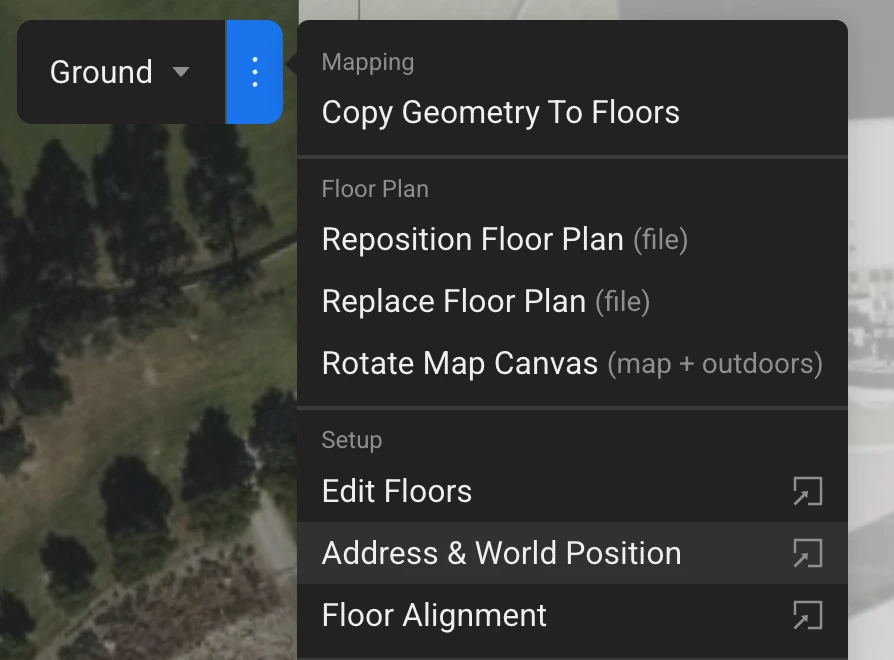
To correct geo-referencing, open the options menu (three dots) and select the ‘Address and World Position’ option to update the map’s location.
How much does it cost?
There are free and paid tiers. Paid features can be used and previewed while on the free tier, and are removed from the Live map when made public. See the Mappedin Pricing Page for current rates and a full feature breakdown, including volume and enterprise options.
How are maps shared?
Open Preview Mode by clicking on the preview button
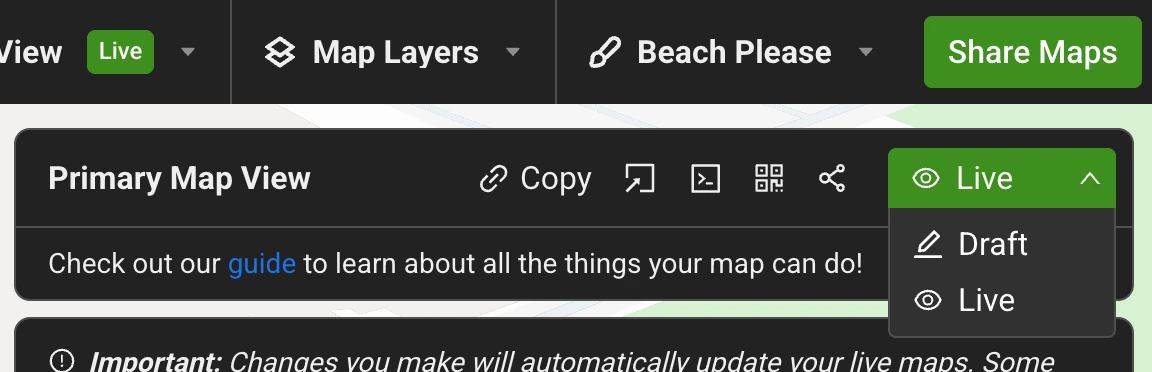
Click on the 'Share Maps' button to open the panel
Change the status from 'Draft' to 'Live' and the map is now public and shareable.
Maps can also be exported in formats such as Mappedin Venue Format (MVF) and PDF, so that they can be ingested into custom solutions
Can a map be embedded on a website?
Yes. To generate a shareable link or embed code directly, see the Web Embed guides for step-by-step instructions for platforms like WordPress, Webflow, Squarespace, and more.